top of page
.jpg)
Volume Changes in Hearing Aids
Many factors can influence the audio quality of phone calls received through your Phonak hearing aids.
-
Volume is too low: Increase the volume if the volume control is available.
-
Low battery: Charge the hearing aid or replace the battery if you have a non-rechargeable model.
-
Speaker/earpiece is blocked: Clean the speaker opening/earpiece. Change the earwax filter if your hearing aid model is equipped with earwax protection.
-
Hearing has changed: Contact your hearing care professional.
Program switching from Bluetooth to Auto-sense:
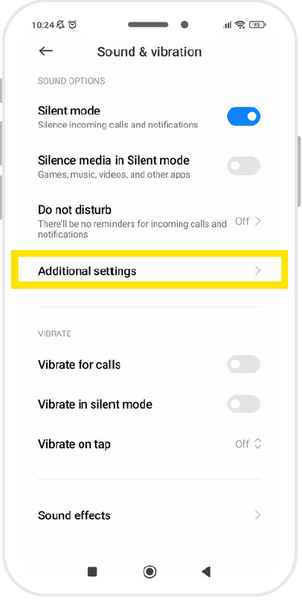
If when using hearing aids the volume fluctuates up and you have an active Bluetooth connection you may need to turn off system sounds in your phone settings.
Follow the below instructions:


bottom of page